RSS Feed Generator: Convert Any Blog to RSS in 2026
Discover how RSS feed generators transform any blog into an RSS feed. Learn to automate content aggregation, bypass algorithm fatigue, and stay updated with your favorite sites effortlessly.
In 2026, we're drowning in content. Social media algorithms decide what you see, email newsletters flood your inbox, and your favorite blogs update without notice. What if you could take back control?
RSS feed generators are your secret weapon for curating content on your terms. They transform any blog—even those without native RSS feeds—into clean, algorithm-free content streams you can read anywhere, anytime.
In this comprehensive guide, you'll learn how RSS feed generators work, why they're essential in 2026, and how to use FeedLake RSS Generator to aggregate content from platforms in minutes.
What is an RSS Feed Generator?
An RSS feed generator is a tool that automatically converts web content—like blog posts, news articles, or podcasts—into RSS (Really Simple Syndication) feeds. These feeds enable content syndication, delivering updates directly to your RSS reader without requiring you to visit multiple websites.
How RSS Feed Generators Work
Think of an RSS feed generator as a smart content aggregator. Here's the process:
- Web Scraping: The generator visits your target blog and identifies content elements (titles, dates, descriptions, images)
- Content Extraction: It extracts structured data from the HTML using pattern recognition and AI
- RSS Formatting: The extracted data is converted into standardized RSS 2.0 or Atom XML format for blog aggregation
- Feed Hosting: Your generated feed is hosted on a permanent URL that updates automatically
- Reader Integration: You subscribe to this URL in any RSS reader (FeedLake Reader, Feedly, Inoreader, NetNewsWire, etc.)
How to Use FeedLake RSS Generator: Step-by-Step
Creating an RSS feed with FeedLake takes 4 simple steps: find your target blog, sign up for a free account, generate the feed with one click, and add the feed URL to any RSS reader. The entire process takes under 5 minutes with no technical knowledge required.
Let's walk through creating your first RSS feed with FeedLake:
Step 1: Find Your Target Blog
Identify the blog you want to convert to RSS. It could be:
- A Medium publication without a working RSS feed
- A company blog built with custom CMS
- A personal WordPress blog with broken feed links
- News sites, forums, or any content-driven website
Pro tip: FeedLake supports multiple platforms including WordPress, Wix, Squarespace, Ghost, Webflow, Shopify blogs, and more.
Step 2: Sign Up (Free Tier Available)
- Visit rssgenerator.ai
- Click "Get Started Free"
- Sign up with email (no credit card required)
Free tier includes:
- 3 RSS feeds included
- 24h automatic refresh rate
- Works with WordPress, Shopify & more
- 1 individual
Step 3: Create Your First Feed
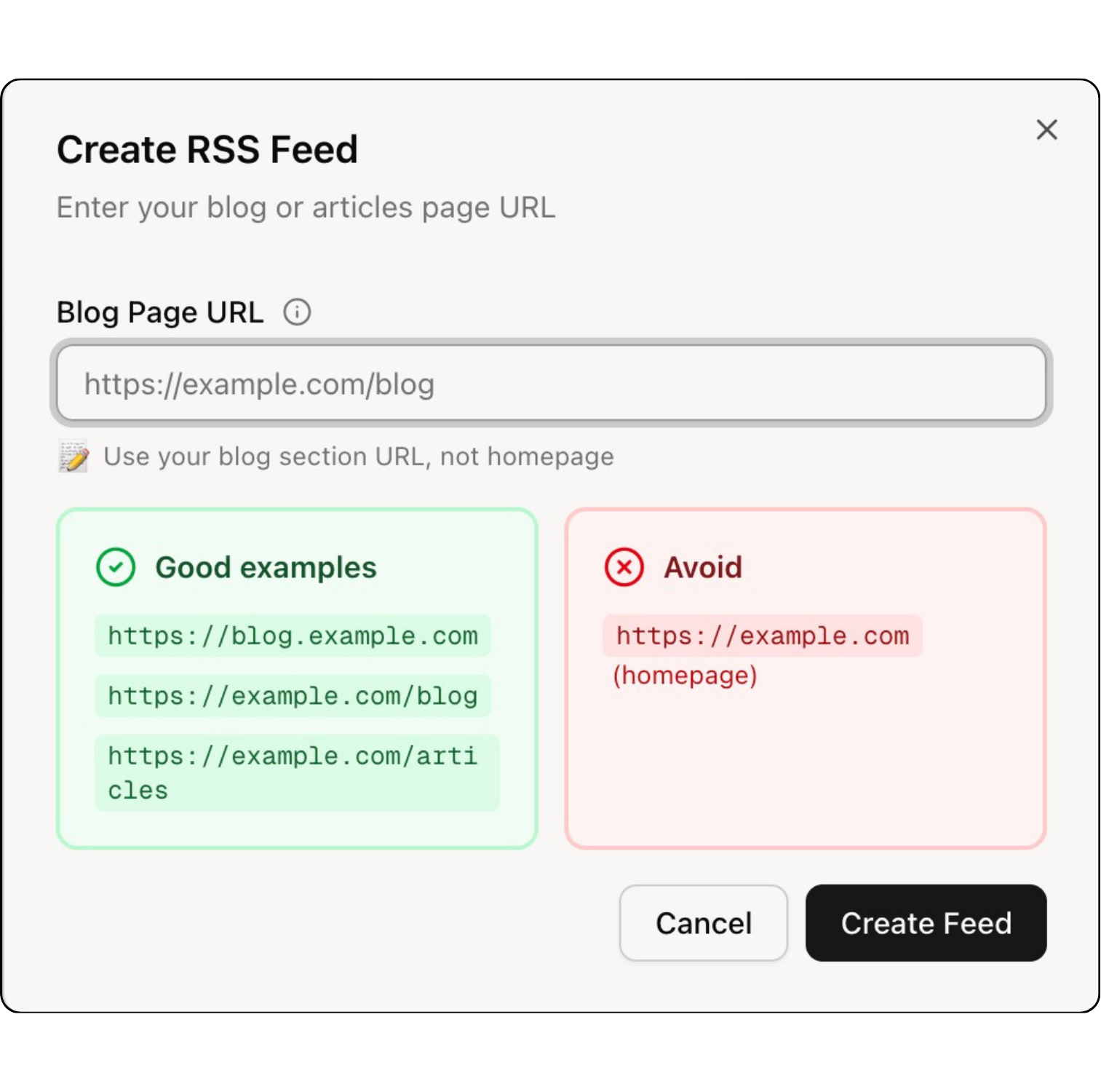
Once logged in:
- Click "New Feed" in the dashboard
- Paste the blog's URL (e.g.,
https://example.com/blog) - FeedLake automatically detects the blog structure
- Click "Generate Feed"
That's it! FeedLake provides you with a permanent RSS feed URL like:
https://rss.feedlake.ai/your-feed-name.xml?token=your-unique-token
Step 4: Add to Your RSS Reader
Copy your feed URL and add it to your favorite RSS reader:
- FeedLake Reader (feedlake.ai): Best experience with advanced features
- Feedly: Click "Add Content" → Paste URL
- Inoreader: Click "+" → "Feed" → Paste URL
- NetNewsWire (Mac/iOS): File → New Feed → Paste URL
- NewsBlur: Click "Add Site" → Paste URL
Take Control of Your Content Consumption Today
The internet is better when you decide what to read, not an algorithm.
RSS feed generators like FeedLake give you that power. Transform any blog into a clean, portable, privacy-respecting feed. Aggregate dozens of sources into topic-based streams. Read on your terms, on your schedule.
Your Next Steps:
- Sign up for FeedLake's free tier (no credit card) → rssgenerator.ai
- Generate your first 3 RSS feeds from your favorite blogs
- Add feeds to your RSS reader (we recommend FeedLake Reader at feedlake.ai for the best experience, or Feedly/Inoreader for alternatives)
- Upgrade to Pro ($9/month) to track up to 20 sources, or Team ($29/month) for 100+ sources
Ready to get started?
Create your first RSS feed in under 2 minutes.
Free plan available • No credit card required
Frequently Asked Questions
What RSS readers work with generated feeds?
All of them! FeedLake generates standard RSS 2.0 and Atom feeds compatible with every RSS reader: FeedLake Reader (feedlake.ai), Feedly, Inoreader, NewsBlur, NetNewsWire, Reeder, Readkit, Fluent Reader, Thunderbird, Outlook, and 100+ others. If it can read RSS, it works with FeedLake.
How often do generated feeds update?
Free tier: Every 24 hours
Pro tier: Every hour
Team tier: Faster updates with priority processing
Is FeedLake RSS generator free?
Yes! FeedLake offers a free tier that includes 3 RSS feeds with 24-hour updates. No credit card required to start. You can upgrade to Pro ($9/month) for 20 feeds with hourly updates, or Team ($29/month) for 100+ feeds with priority processing.
What happens if the source blog changes its layout?
FeedLake's intelligent parsing system automatically detects when a blog changes its layout and adapts the content extraction accordingly. Your feeds continue working seamlessly without manual intervention, even when websites redesign or update their structure.
Do I need technical skills to use FeedLake?
No technical skills required! Simply paste a blog URL, and FeedLake automatically generates an RSS feed in seconds. The entire process is point-and-click, making it accessible to anyone who can browse the web.
Can I use generated feeds commercially?
Yes, with FeedLake Pro or Team plans. Commercial use includes content monitoring for clients, competitive intelligence dashboards, news aggregation for company intranets, or data feeds for AI training. The free tier is limited to personal use only.
Next Steps
Now that you understand how RSS feed generators work, explore these related guides:
Troubleshooting:
- RSS Feed Not Working? 7 Common Issues and How to Fix Them – Diagnose and fix broken RSS feeds in minutes
Strategy:
- RSS vs Email Newsletters: Which is Better? – Compare content distribution methods and choose the right strategy
Get started:
- Generate your first RSS feed – Free tier includes 3 feeds with 24-hour updates
Share this article
FeedLake Team
Content Team
1 article published
Our team specializes in RSS feed generation, content syndication, and automation. We help businesses and creators distribute their content effectively.
You Might Also Like
RSS vs Email Newsletters: Which Should You Use?
RSS feeds vs email newsletters: Compare reach, engagement, privacy, and monetization. Learn which content distribution method works best for your blog in 2026.

RSS Feed Not Working? 7 Common Issues and How to Fix Them
Is your RSS feed broken or not updating? Discover the 7 most common RSS feed issues and learn exactly how to fix them in minutes with our troubleshooting guide.